R-Studio v8.12 Build 175721 Download + Activation – LostData Recovery
R-Studio v8.12 Build 175721 Download
Introduction
Empowered by the new unique data recovery technologies, R-Studio is the most comprehensive data recovery solution for files from NTFS, NTFS5, ReFS, FAT12 / 16/32, exFAT, HFS / HFS + and APFS (Macintosh), Little and Big Endian variants of UFS1 / UFS2 (FreeBSD / OpenBSD / NetBSD / Solaris) and Ext2 / Ext3 / Ext4 FS (Linux) partitions. It also uses raw file recovery (scan for known file types) for heavily damaged or unknown file systems. It functions on local and network disks, even if such partitions are formatted, damaged or deleted. Flexible parameter settings give you absolute control over data recovery.
In addition to being a full-featured data recovery utility, R-Studio also includes:
- An advanced RAID reconstruction module
- A feature-rich text / hexadecimal editor
- An entire advanced disk copying / imaging module in a single piece of software, which makes R-Studio your ideal complete solution for creating a data recovery workstation.
R-Studio utilities recover files:
- Deleted without Recycle Bin, or when Recycle Bin has been emptied;
- Removed by virus attack or power failure;
- After the partition with the files was reformatted, even for a different file system;
- When the partition structure on a hard disk was changed or damaged. In this case, R-Studio utilities can scan the hard disk trying to find previously existing partitions and recover files from found partitions.
- From hard disk with bad sectors. R-Studio Data Recovery Software can first copy the entire disk or its part into an image file and then process the image file. This is especially useful when new bad sectors are constantly appearing on the hard disk and the remaining information must be saved immediately.
System Requirements
- An Intel-compatible platform running Windows 2000 / XP / 2003 / Vista / 2008/7/8 / 8.1 / 10/2012/2016.
- At least 256 MB of RAM, one mouse, and enough disk space for recovered files, image files, etc.
- The administrative privileges required to install and run R-Studio utilities.
- A network connection for data recovery over the network.
Installation Guide
Setup Version
- Start the software installation process by running
R-Studio v8.12 Build 175479 Network Technician Ml.exefile. Make sure you do not install software on a drive that contains deleted files. - At the end of the installation, be sure to
uncheck Launch R-Studio. - Copy the
r-studio_rportable_rec.exefile and place it in the software installation (C:\Program Files (x86)\R-STUDIO Network Technicianby default). - Right-click on the
r-studio_rportable_rec.exefile and clickRun as Administrator. - Select the
Technicianoption (check). Enter custom values for Name and Company.
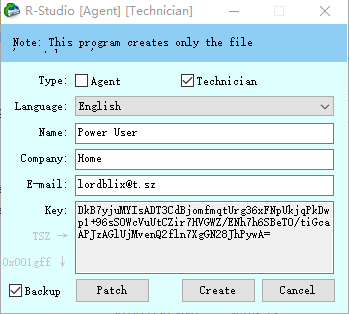
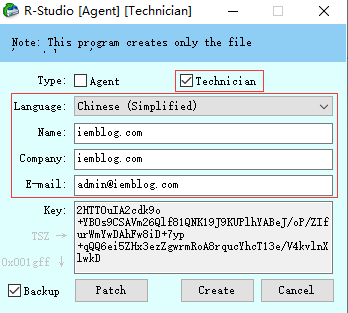
- Click on
Patch. If the browser opens, selectRStudio64.exeorRStudio32.exefrom the installation locationC:\Program Files (x86)\R-STUDIO Network Technician. (Choose the 32-bit or -64-bit file according to your operating system) - Click
Create.
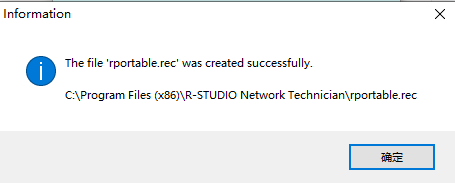
- Enjoy!
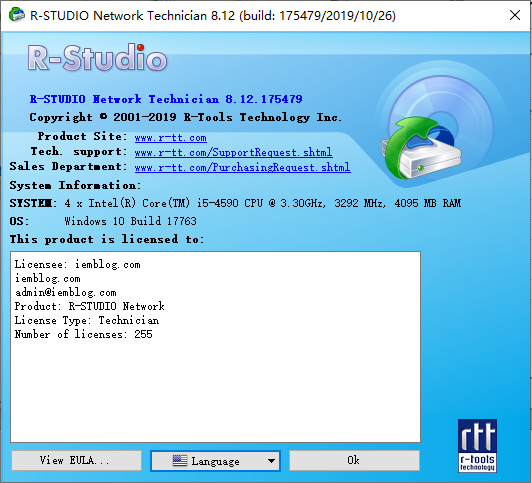
Portable Version
Unzip R-Studio v8.12 Build 175479 Network Technician Portable Ml.zip directly, and then choose to run RStudio64.exe or RStudio32.exe file according to your operating system!
下载仅供下载体验和测试学习,不得商用和正当使用。